Well, I can make all kinds of excuses for not being able to update this blog, but there's one thing that explains it all:
early Christmas present by =Waterdroplet-s on deviantART
or
handshake by =Waterdroplet-s on deviantART
Yeah... a new baby decided to drop by in the middle of Dec 2010 and was busy preparing and taking care of her lately.
Anyway, here are stuff I've created since the last update:
train by =Waterdroplet-s on deviantART
snow by =Waterdroplet-s on deviantART
moment by =Waterdroplet-s on deviantART
light bulb by =Waterdroplet-s on deviantART
and the latest:
dog by =Waterdroplet-s on deviantART
Showing posts with label Cinema 4D. Show all posts
Showing posts with label Cinema 4D. Show all posts
Friday, February 4, 2011

Monday, October 25, 2010
Update
Once again, it's been more than a month since I last updated this blog. I have been busy lately so I wasn't able to update Japanese blog as well.
The latest illustration is up only in Pixiv since it was for a contest. As a result, I can only put a link to it:
http://www.pixiv.net/member_illust.php?mode=medium&illust_id=14061391
It's viewable for members but non-members can view a thumbnail.
What's different between last and this month is that I got Vray for Cinema 4D. As a result, I could have better render for my 3D CG. However, it's taking longer than usual to get use to it :3
Anyway, other stuff I did besides it:
I used Vray for this as well:
Illustration/3D CG:
operation room by =Waterdroplet-s on deviantART
space by =Waterdroplet-s on deviantART
A test using Vray:
model room by =Waterdroplet-s on deviantART
city at night by =Waterdroplet-s on deviantART
It was just a joke:
42 by =Waterdroplet-s on deviantART
Photography:
rasberry 1 by =Waterdroplet-s on deviantART
rasberry 2 by =Waterdroplet-s on deviantART
rasberry 3 by =Waterdroplet-s on deviantART
The latest illustration is up only in Pixiv since it was for a contest. As a result, I can only put a link to it:
http://www.pixiv.net/member_illust.php?mode=medium&illust_id=14061391
It's viewable for members but non-members can view a thumbnail.
What's different between last and this month is that I got Vray for Cinema 4D. As a result, I could have better render for my 3D CG. However, it's taking longer than usual to get use to it :3
Anyway, other stuff I did besides it:
I used Vray for this as well:
Illustration/3D CG:
operation room by =Waterdroplet-s on deviantART
space by =Waterdroplet-s on deviantART
A test using Vray:
model room by =Waterdroplet-s on deviantART
city at night by =Waterdroplet-s on deviantART
It was just a joke:
42 by =Waterdroplet-s on deviantART
Photography:
rasberry 1 by =Waterdroplet-s on deviantART
rasberry 2 by =Waterdroplet-s on deviantART
rasberry 3 by =Waterdroplet-s on deviantART
Monday, February 15, 2010
Wallpaper + 3D CG model
I had cold at the end of last week and finally recovered.
Here's wallpaper (for personal usage only):
music 2 by =Waterdroplet-s on deviantART
Here's wallpaper (for personal usage only):
music 2 by =Waterdroplet-s on deviantART
Photoshop CS2 (I did it in CMYK mode)
Comic Studio Ex 4
2 days
and 3D CG model that you can use without a credit for commercial/personal use if you have a software that can support .obj 3D file:
bucket-3D CG model by =Waterdroplet-s on deviantART
and 3D CG model that you can use without a credit for commercial/personal use if you have a software that can support .obj 3D file:
bucket-3D CG model by =Waterdroplet-s on deviantART
Cinema 4D R11 studio
a few min
I have some simple 3D CG models uploaded in Clip Studio website (Japanese site for IllustStudio/Comic Studio users) under the username Vole36. I will change that in a month or two to my usual one though.
This was created from my usual doodle like 3D CG activity:

This was created from my usual doodle like 3D CG activity:

Thursday, January 14, 2010
BW illust/doodle
Group shot by =Waterdroplet-s on deviantART
The 3D CG I made and used in this illust:

(I finally figured out how to render the wireframe by doing Effect>>Cel Renderer (Outline, Edge)at Render Setting. I can't believe that it took this long to figure out such thing)
What I did differently this time was to draw more than one character in one BW drawing, and use a different rendering method for 3D CG.
I used to render in Cinema 4D and pasted it or traced it in another software. This time, I rendered using IllustStudio/Comic Studio since I finally found out that exporting Cinema 4D files in Wavefront format produced .obj format files, and that could be incorporated into those 2D CG drawing softwares.
It's been a year since I had Comic Studio Ex 4, and ugh... it took me more than a year to figure out wireframe render.
I used a camera's lens effect to change the shape of 3D CG render to have a movement in illustration.
Cinema 4D R11 studio
Comic Studio Ex 4
IllustStudio 1.1.0 (since I didn't have Comic Studio in another computer)
~ a week
Friday, December 18, 2009
Silence by =Waterdroplet-s on deviantART
Wallpaper version is here:
http://Waterdroplet-s.deviantart.com/art/Wallpaper-pack-silence-147044281
1920X1200 pixel
1600X1200 pixel
available for download for personal usage only
Cinema 4D R11 studio
Comic Studio Ex 4
IllustStudio 1.0.10
Photoshop CS3
~1 month
Friday, November 13, 2009
Wallpaper and concept art practices
Wallpaper: Lights and Shadows by =Waterdroplet-s on deviantART
1920X1200 pixel
1600X1200 pixel
available for download for personal usage only in the link above.
It's wip:

Cinema 4D R11 studio
Photoshop CS3
Modeling: 30 min, Rendering: ~1 hr, Editing: 5-10 min
and concept art practice:
Concept art practice 9 by =Waterdroplet-s on deviantART
Photoshop CS3 (used brushes by Jama and concept-on-mac. Thank you.)
Photos: Osaka photo I took with a mobile phone a few weeks ago, 素材辞典(Sozaijiten) Vol. 168- probably Tokyo or something.
3 nights?
Thursday, October 22, 2009
3D CG+Illustration: Modern Room
modern room by =Waterdroplet-s on deviantART
Aimed for interior design look.
Photoshop CS3
Cinema 4D R11 studio (Global Illumination)
SAI
~ 6 nights
I was originally planning to start drawing manga after this illustration, but the script and the background image is still not ready. So... I will do concept art on Photoshop after this since I got brushes from Jamshed Jurabaev last night. Thank you so much!!
I found out last night, but he works as a designer in Tajikistan under href="http://www.ustodesign.tj/">Ustodesign. He's very kind and helpful to other artists so I kind of became a fan recently... well.... I became a fan once I spotter his concept art a month or two ago.
His work:
The path by *jamajurabaev on deviantART
His technique I'm planning to use for the next concept art is the use of
Alchemy
It's an open share software (is that how people call free softwares?) and is usable in Linux, Windows, and Mac. I tested it out last night and both worked fine in Mac though tended to be a bit slow compared to Vista. I don't know how to use Volume thing but supposedly, it creates images with sound through microphone or something.
He used this for character concept art and painted more in Photoshop as seen here:
Characters 3 by *jamajurabaev on deviantART
My attempt with the software:
1st Round:
 |
| 送信者 Waterdroplet's Blog |
2nd Round:
 |
| 送信者 Waterdroplet's Blog |
Third:
 |
| 送信者 Waterdroplet's Blog |
Fourth:
 |
| 送信者 Waterdroplet's Blog |
Positive side:
- Usable in both Mac and PC unlike inkscape which claimed that it was usable but couldn't in Mac OSX
- light and easy to learn
- in both Japanese and English
Downside:
There's no undo option- so must erase the canvas completely in order to get rid of a mistake
I think it's a good program to have besidesApophysis.
Apophysis 2.09 attempt (mistakenly rendered with a light shade):

The following are practices I did with Cinema 4D, trying to test how to manipulate 3D CG model so it will have asymmetrical organic object kinda look+duplication method so I could create chains:
Practice using metaball (right) and atom (center)

Ball and chain thingmy:

Chain

Trying to manipulate 3D CG into asymmetric shapes by pulling, smear, smoothening, and etc. using a brush tool (originally a sphere):

and transparency test (used gradation +turbulence):

All of them took a few min. to create. I think the last one was the most interesting so I might use this technique for the next 3D CG.
Wednesday, October 7, 2009
Digital painting: Gensou + some photos
Wallpaper: Gensou by =Waterdroplet-s on deviantART
I referred to glacier in Iceland and rocks on Ireland, but it didn't really turn out the way I expected it to be.
Since it's 4:3 format, I made it into a wallpaper. Personal usage only.
Corel Painter X
Photoshop CS3
~ 1 week
Photos I took over the weekend and a few weeks before:
高台寺(Kodai-ji Temple, Kyoto) (this Sun):

Two weeks ago at 岡山 (Okayama), a few hours before I passed out from flu:

Random shots with DSLR:


My dog as a model:

I think he wants to become a pâtissier or something:

Lumix TZ7
Kiss X3+ EF-S18-55mm F3.5-5.6 IS
Photoshop CS3
and oh... random abstract 3D CG:
blob by =Waterdroplet-s on deviantART
Cinema 4D R11
Photoshop CS3
30 min- 1 hr.
Friday, December 5, 2008
3DCG practice
These days, I'm following on-line tutorials about Photoshop skills and techniques such as Web Design Library (日本語版)and PSDTUTS
I usd two tutorials (half tone and virtual orange) from such sites for this:
Wallpaper: Ame by =Waterdroplet-s on deviantART
I think they have great techniques there and I used orange tutorial and half tone tutorial (but in my case, I did in alpha channel).
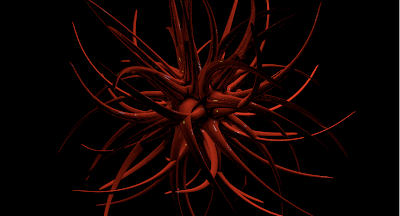
Anyway, practicing w/ Cinema 4D using two tutorials:
Beginning:
End:
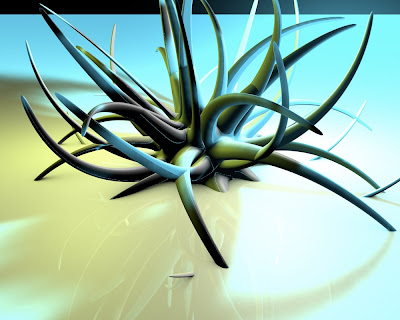
By using two hypernurbs, I was able to smoothen out the tentacles. I used 3 lights (yellow, light cyan, and white for this)
So, I learned three stuff:
- how to smoothen out models
- how to create models with glossy appearance
- changing camera angles
Software used:
Cinema 4D R11 studio
Songs I listened today:
Promise by MiChi
Viva La Vida by Coldplay
I usd two tutorials (half tone and virtual orange) from such sites for this:
Wallpaper: Ame by =Waterdroplet-s on deviantART
I think they have great techniques there and I used orange tutorial and half tone tutorial (but in my case, I did in alpha channel).
Anyway, practicing w/ Cinema 4D using two tutorials:
Beginning:

End:

By using two hypernurbs, I was able to smoothen out the tentacles. I used 3 lights (yellow, light cyan, and white for this)
So, I learned three stuff:
- how to smoothen out models
- how to create models with glossy appearance
- changing camera angles
Software used:
Cinema 4D R11 studio
Songs I listened today:
Promise by MiChi
Viva La Vida by Coldplay
Sunday, November 30, 2008
Today's 3DCG practice
before I fell asleep for staying up until 3 am last night:

Basically, a practice with lighting and trying to make a word to look 3D.
...
You can learn a lot from cows since after all- they can jump over the moon.

Basically, a practice with lighting and trying to make a word to look 3D.
...
You can learn a lot from cows since after all- they can jump over the moon.
Wednesday, November 5, 2008
Tuesday, November 4, 2008
3DCG animation practice
Yeah... Call it the major disaster for my first 3DCG animation attempt:
http://daydreamingsky.blog94.fc2.com/blog-entry-827.html
Site's in Japanese- but you can watch it without any lang. problem- probably. It didn't work when I posted the video directly here.
I used texture from Princess of Shadows's stock for the second animation.
http://daydreamingsky.blog94.fc2.com/blog-entry-827.html
Site's in Japanese- but you can watch it without any lang. problem- probably. It didn't work when I posted the video directly here.
I used texture from Princess of Shadows's stock for the second animation.
Monday, October 20, 2008
Done with commissions!!
I finished all my commissions yesterday:
Commision: Woman's face 2 by =Waterdroplet-s on deviantART
and
released my ID picture (though I don't look like this lol) for one site:
Doodle: one with clock by =Waterdroplet-s on deviantART
I'm currently trying to practice adding texture to my graphics- esp. 3DCG. So, as I practiced 3DCG in Cinema 4D:

I changed the material setting of balls and turned out to be:

Still, I need to texture to make it more realistic, so I'm going to use this anime/manga drawing to practice texture:

Even though I don't like BL, I seem to have a tendency to draw mostly males.
...
Ok, his pupils are not focused and lines are rough.
Commision: Woman's face 2 by =Waterdroplet-s on deviantART
and
released my ID picture (though I don't look like this lol) for one site:
Doodle: one with clock by =Waterdroplet-s on deviantART
I'm currently trying to practice adding texture to my graphics- esp. 3DCG. So, as I practiced 3DCG in Cinema 4D:

I changed the material setting of balls and turned out to be:

Still, I need to texture to make it more realistic, so I'm going to use this anime/manga drawing to practice texture:

Even though I don't like BL, I seem to have a tendency to draw mostly males.
...
Ok, his pupils are not focused and lines are rough.
Monday, September 29, 2008
Latest doodles...
I tried to practice anime style.
Sat:

Fri:

I still need to get the hang of coloring hair.
3DCG attempt with Cinema4D:

~ managed frizzy fur ball and cloning :p
Sat:

Fri:

I still need to get the hang of coloring hair.
3DCG attempt with Cinema4D:

~ managed frizzy fur ball and cloning :p
Monday, September 22, 2008
Er... yeah....
I was trying out the demo version of Cinema 4D and Maya last night since I want to get good 3DCG software used by pros. I am the real beginner in 3DCG, but I was adviced to use softwares that pro use so I could get used to the tools of the trade. I asked several pro-level artists and these were what I landed with.
Maya (good for still images and movies)... I had no idea how to use it.
Cinema 4D(C4D) is easier to use... though it's not good for movies. Since I do still image, I think this software is better for me. However I still don't know how I got this:
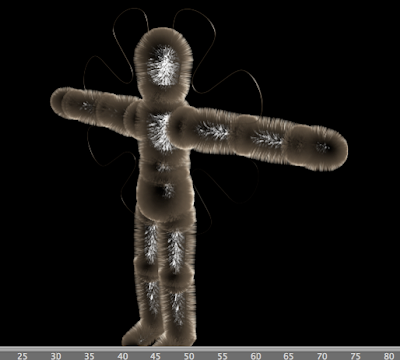
This figure first had hair only on its butt so I tried to add more and...
Lol
There's no problem about this thing worrying about losing too much hair, huh?
Maya (good for still images and movies)... I had no idea how to use it.
Cinema 4D(C4D) is easier to use... though it's not good for movies. Since I do still image, I think this software is better for me. However I still don't know how I got this:

This figure first had hair only on its butt so I tried to add more and...
Lol
There's no problem about this thing worrying about losing too much hair, huh?
Subscribe to:
Posts (Atom)